
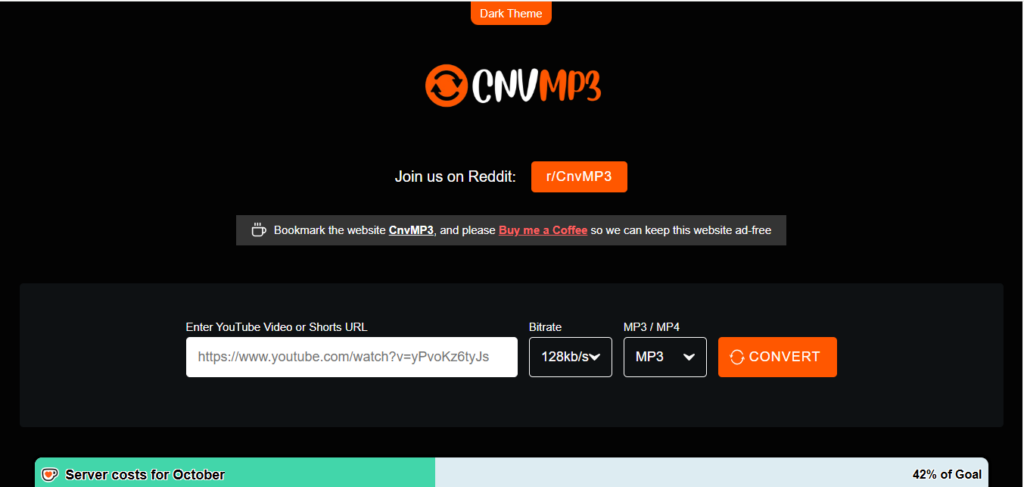
CNVMP3 is a popular free YouTube to MP3 converter known for ad-free use and 320kbps audio quality, but regional restrictions and occasional conversion failures push many users to look elsewhere. The best alternatives include YTMP3, EzMP3, ClipGrab, 4K YouTube to MP3, and Freemake Audio Converter, each offering different combinations of speed, format support, and ease of use.
If you’ve ever tried converting a YouTube video to MP3 only to hit an error message or a geo-block, you know the frustration. CNVMP3 built a loyal following by offering free, ad-free conversions at up to 320kbps and supporting videos as long as three hours. That’s no small feat in a space crowded with sketchy pop-up-heavy sites.
But no tool is perfect. Some CNVMP3 users report inconsistent uptime, occasional failed conversions, and limited support for platforms beyond YouTube. If you’re one of them, or you’re simply shopping around before committing to a converter, this guide walks through ten solid alternatives worth testing in 2026.
A quick note before diving in: always check the copyright status of any audio you download, and only convert content you have the right to use. Converting copyrighted music without permission can violate YouTube’s terms of service and copyright law in many countries.
What should you look for in a CNVMP3 alternative?
Before comparing tools, it helps to know what actually matters. A good YouTube to MP3 converter should offer:
- Audio quality options, ideally up to 320kbps
- No mandatory software downloads (for browser-based tools)
- Minimal ads and pop-ups
- Reliable uptime without constant regional blocks
- Support for long videos, not just short clips
- Safe file delivery, free from bundled malware or browser hijackers
With those criteria in mind, here’s how the top contenders stack up.
1. YTMP3
YTMP3 is one of the most recognizable names in the YouTube to MP3 conversion space. It’s browser-based, requires no account, and converts videos quickly by simply pasting a URL. The interface is minimal, which makes it a good pick if you want speed over extra features. The trade-off is that free browser tools like this often carry ad-driven revenue models, so expect some banner ads during use.
Choose YTMP3 if you want a no-frills, fast conversion experience and don’t mind a lighter ad presence.
2. EzMP3
EzMP3 positions itself as a straightforward alternative with support for multiple output formats, not just MP3. It also tends to handle batch-style conversions reasonably well, which matters if you’re converting more than one video at a time. Like most free converters, performance can vary depending on server load.
Choose EzMP3 if you want format flexibility beyond standard MP3 output.
3. ClipGrab
ClipGrab is a downloadable desktop application rather than a browser tool, which some users prefer for added control and offline use. It supports downloading from several video platforms, not just YouTube, and lets you choose output formats including MP3, MP4, and OGG Vorbis. Because it’s a desktop install, it’s worth downloading only from the official ClipGrab website to avoid bundled software.
Choose ClipGrab if you want a desktop tool with multi-platform support and format choices.
4. 4K YouTube to MP3
Developed by 4K Download, this tool has built a reputation for reliability and a clean, modern interface. It supports playlist conversion, which is handy if you’re trying to pull audio from an entire album or podcast series in one go. The free version does come with daily download limits, with a paid tier available for unlimited use.
Choose 4K YouTube to MP3 if you regularly convert playlists and want a polished, well-maintained application.
5. Freemake Audio Converter
Freemake has been around for years and is known for its simple drag-and-drop interface. It supports a wide range of audio formats beyond MP3, including WAV, FLAC, and AAC. It’s primarily designed as a general audio converter rather than a YouTube-specific tool, so you may need to pair it with a separate downloader first.
Choose Freemake Audio Converter if you need broader audio format conversion, not just YouTube extraction.
6. OnlineVideoConverter
This browser-based tool supports conversion from several video platforms in addition to YouTube. It’s been a long-standing name in the space, though like many free converters, uptime and server speed can fluctuate during peak usage hours.
Choose OnlineVideoConverter if you want multi-platform support without installing software.
7. Y2Mate
Y2Mate offers both video and audio downloads with a straightforward process: paste a link, pick a format, and download. It supports multiple resolution and bitrate options, giving users some control over output quality. As with other free ad-supported tools, expect some pop-up ads during the conversion process.
Choose Y2Mate if you want resolution and bitrate flexibility in one tool.
8. FLVTO
FLVTO focuses specifically on audio extraction and has a reputation for consistent MP3 output quality. It’s a lightweight, browser-based option that doesn’t require account creation, making it a quick option for occasional use.
Choose FLVTO if you want a simple, dedicated MP3 extraction tool without extra features.
9. MP3Studio
MP3Studio is a desktop application built specifically for downloading and converting YouTube audio. It includes a built-in search function, so you don’t need to leave the app to find videos, and it supports batch downloads. Being a downloadable program, it’s best sourced directly from the developer’s official site.
Choose MP3Studio if you want an all-in-one desktop app with built-in search and batch processing.
10. Airy
Airy is another desktop-based YouTube downloader that supports both video and audio extraction. It’s built with a focus on simplicity, letting users select resolution and format before downloading. It offers a free trial with limited downloads before requiring a paid license.
Choose Airy if you want a dedicated desktop app and don’t mind a free trial limit before upgrading.
Which CNVMP3 alternative is right for you?
There’s no single best answer here. It depends on what you value most.
If speed and simplicity matter most, browser-based tools like YTMP3 or FLVTO get the job done without installation. If you convert playlists often, 4K YouTube to MP3 is built for that. And if you want broader format support or offline functionality, a desktop option like ClipGrab or MP3Studio makes more sense.
Whichever tool you choose, stick to official websites, watch out for bundled software during desktop installs, and respect copyright when downloading audio. A little caution goes a long way toward keeping your downloads safe and your conscience clear.